Coral and Teal Digital Paper Patterns for Creative Projects
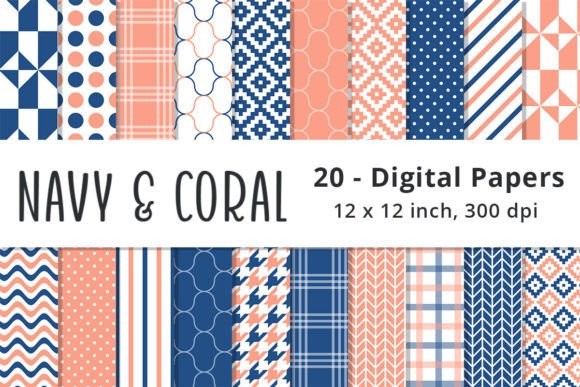
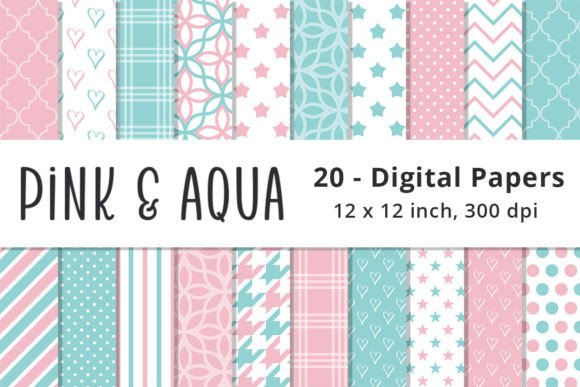
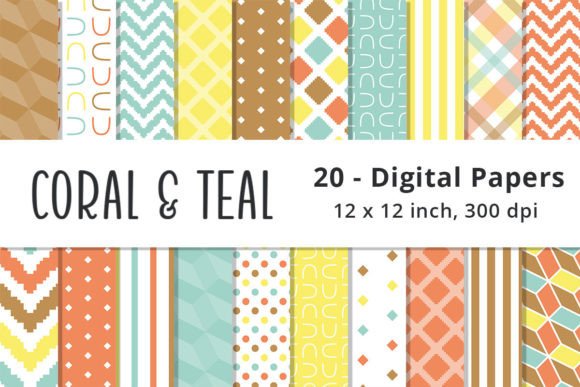
Coral and Teal Digital Paper Patterns are a versatile collection of 20 high-resolution JPG files designed for digital creators, designers, and hobbyists. These patterns feature a vibrant color palette that includes Coral Orange, Teal Blue, Yellow, and Brown, combined with various geometric designs such as Stripes, Polka Dots, Plaid, Chevron, and more. Each paper measures 12 x 12 inches at 300 dpi, making them ideal for use in scrapbooking, backgrounds, paper crafts, cards, invitations, print-on-demand (POD) projects, and other creative endeavors.
Understanding the Value of Digital Paper Patterns
Digital paper patterns offer a convenient alternative to traditional physical papers, allowing users to access and apply them instantly across multiple platforms. The Coral and Teal collection is particularly useful for those who need consistent visual elements without the hassle of scanning or printing physical materials. These flattened raster files are optimized for immediate use in graphic design software, layout tools, and online publishing platforms.
The inclusion of multiple geometric patterns ensures that users can find a suitable design for any project, whether it's a minimalist card or a bold invitation. The combination of warm and cool tones also provides flexibility in creating cohesive themes or contrasting elements within a single design.
Integrating Coral and Teal Digital Papers into Your Workflow
These digital papers can be used at various stages of a creative process. Before starting a project, they serve as a foundation for planning layouts, selecting color schemes, and determining visual hierarchy. During the execution phase, they act as background elements, decorative accents, or text overlays. After completing a project, they can be used for final touches, such as adding texture or enhancing the overall aesthetic.
For example, when designing an invitation, you might start by using a Coral Stripe pattern as the base background. Then, layer a Teal Plaid pattern over a section to create contrast. Finally, add a Yellow Chevron border around the edges to frame the content. This layered approach allows for dynamic composition while maintaining visual harmony.
Compatibility and Usability
Since these are raster files in JPG format, they are compatible with most design software, including Adobe Photoshop, Illustrator, Canva, and Inkscape. They can be easily imported into layout programs like Adobe InDesign or Microsoft Publisher, ensuring seamless integration with other assets such as text, images, and vector graphics.
It's important to note that these files are not editable as vectors, so users should consider this when planning their projects. If further customization is needed, additional editing tools or vector-based alternatives may be required.
Practical Implementation Tips
To maximize the usability of Coral and Teal Digital Paper Patterns, it's essential to organize your digital asset library efficiently. Create folders based on project type, color scheme, or pattern style to streamline the selection process. For instance, separate your Coral-themed papers from Teal ones if you're working on a project that requires specific color consistency.
Another tip is to test how different patterns interact with each other before applying them to a full design. Use small sample layouts to see how colors and textures complement one another. This helps avoid unexpected clashes and ensures that the final output meets your expectations.
Additionally, consider the resolution and file size when exporting your final designs. Since the original files are 300 dpi, they are well-suited for print but may require scaling down for web use. Always check the intended output medium to ensure optimal quality and performance.
Use Cases Across Different Industries
Creative professionals, such as graphic designers and illustrators, often rely on digital paper patterns to enhance the visual appeal of their work. These patterns can be used as backgrounds for illustrations, templates for social media posts, or elements in branding materials. Their versatility makes them valuable in both personal and commercial projects.
Entrepreneurs and small business owners can benefit from these patterns when creating marketing materials, packaging designs, or promotional content. A Coral and Teal Chevron pattern could be used as a backdrop for a product photo, while a Plaid design might suit a rustic-themed flyer.
For educators and bloggers, these digital papers provide a quick way to add visual interest to presentations, worksheets, or blog headers. They can be used to create engaging infographics, highlight key points, or differentiate sections of content.
Long-Term Use and Quality Control
When investing in digital paper collections, it's wise to consider long-term use and quality control. High-resolution files like the Coral and Teal collection ensure that your designs maintain clarity even when scaled or printed at larger sizes. This is especially important for projects that will be viewed on multiple devices or printed professionally.
Regularly updating your digital asset library with new patterns and styles can help keep your work fresh and relevant. However, it's also beneficial to retain classic patterns like those found in the Coral and Teal collection for consistency across ongoing projects or brand identity elements.
Quality control involves ensuring that all digital papers are properly labeled, stored, and backed up. Using cloud storage services or external drives can prevent data loss and make it easier to access your files from anywhere.
Efficiency and Organization Techniques
Implementing efficient organization techniques can significantly improve productivity when working with digital paper patterns. One effective method is to categorize files based on usage—such as "Backgrounds," "Borders," "Textures," and "Themes." This classification system makes it easier to locate the right pattern quickly during the design process.
Creating a naming convention that includes the pattern name, color, and date of download can also be helpful. For example, "Coral_Stripes_20231015.jpg" clearly indicates the pattern type, color, and when it was added to your library.
Finally, always preview patterns before applying them to a design. This step helps identify any potential issues, such as low resolution or unwanted texture, before committing to a final layout.
By integrating Coral and Teal Digital Paper Patterns into your workflow thoughtfully, you can enhance the visual impact of your projects while maintaining efficiency and consistency. Whether you're a professional designer or a hobbyist, these patterns offer a reliable resource for creative expression and design excellence.